Copy Data Steward Admin Tool
Tip
Atlas is currently growing and many new features are available. To ensure you get the latest version, contact erianderson@usaid.gov before setting up Atlas.
Before you begin, make sure you are logged into your work-issued Google Workspace account where the Atlas project will be stored.
-
Follow this link to access the Data Steward Admin Tool.
-
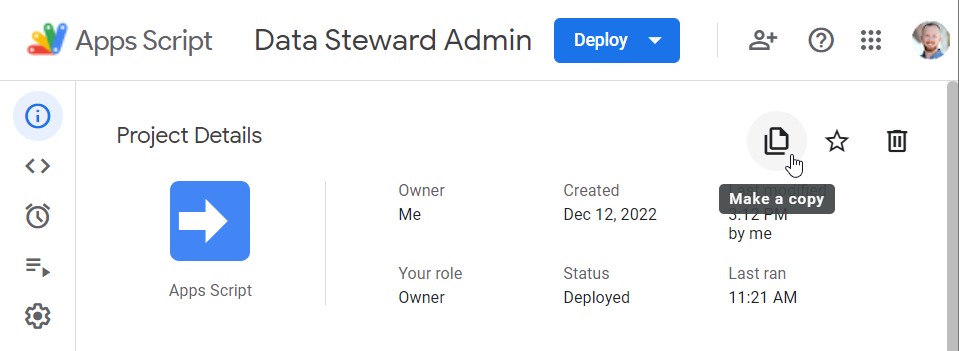
In the Overview window (see the left sidebar), click Make a Copy.
-
The script project will be copied to your repository on script.google.com as
Copy of Data Steward Admin. -
Rename the project to
Data Steward Admin. -
Close the original Data Steward Admin project.
-
Open the Triggers window (see left sidebar).
-
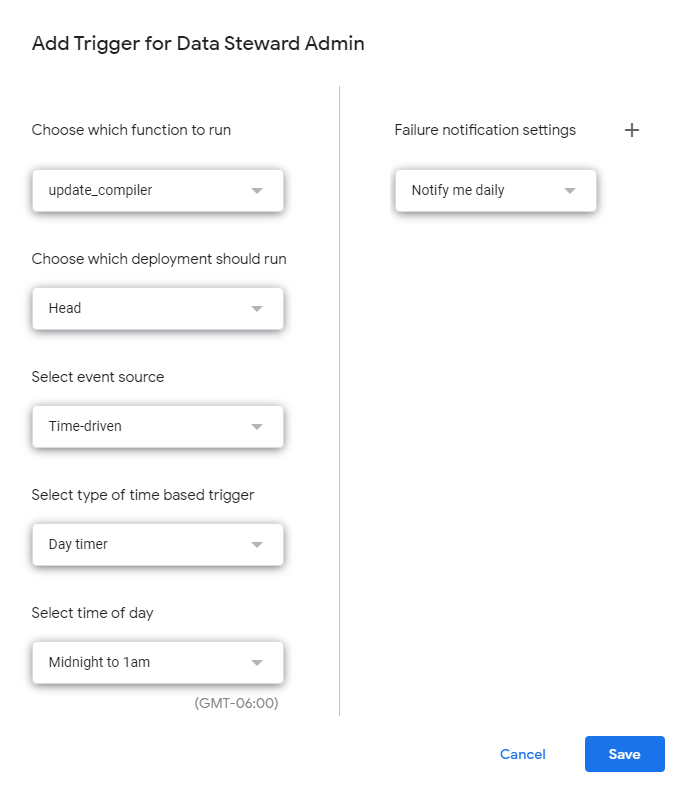
Click Add Trigger to add a new trigger. Select the function
update_compilerto run theHeaddeployment as aTime-driven,Day timerrun overnight. SelectNotify me dailyin the event of a failure. Click Save.